
Having a good-looking website is important, but design alone does not guarantee that people will find it through search engines. A website also needs a strong technical foundation so that search engines can access, understand, and index its pages properly. This is where *Technical SEO plays an important role in making a website easier for search engines to crawl, understand, and index.
Technical SEO focuses on improving the behind-the-scenes parts of a website. It includes website speed, mobile usability, crawling, indexing, site structure, security, URLs, XML sitemaps, redirects, and other technical elements that can affect search visibility and user experience.
Many website owners concentrate mainly on keywords and content. While these are important, technical problems can prevent even high-quality content from performing well. For example, if search engines cannot crawl a page, that page may not appear in search results. Similarly, a slow website can create a poor experience for visitors.
The good news is that many technical improvements can be identified and fixed with regular website audits. In this guide, we will look at practical Technical SEO tips that can help improve website performance and create a stronger foundation for search engine visibility.A strong Technical SEO foundation can help search engines discover and process your website more efficiently.
What Is Technical SEO?

Technical SEO is the process of improving the technical structure of a website so that search engines can crawl, understand, and index its content more effectively.
Unlike content SEO, which focuses mainly on keywords and useful information, Technical SEO deals with how a website works.
Important areas include:
- Website speed
- Mobile responsiveness
- Crawling and indexing
- Website security
- URL structure
- XML sitemaps
- Robots.txt
- Internal linking
- Redirects
- Duplicate content
- Structured data
A technically healthy website makes it easier for both search engines and visitors to navigate the site.
1. Improve Website Loading Speed
Fast website loading is essential for providing visitors with a smooth and enjoyable browsing experience.Technical SEO also helps identify website performance issues that may affect page loading and user experience.
People generally do not want to wait for a page that takes too long to load. If a website is slow, visitors may leave before reading the content or completing an action.
Several factors can affect loading speed, including large images, unnecessary scripts, excessive plugins, poor hosting, and unoptimized website files.
To improve speed, you can:
- Compress large images
- Use modern image formats
- Remove unnecessary plugins
- Reduce unused scripts
- Enable browser caching
- Use a reliable hosting provider
- Minimize unnecessary website elements
You can use tools such as Google PageSpeed Insights to identify performance issues and possible improvements.
A faster website can provide visitors with a smoother browsing experience.
2. Make Your Website Mobile-Friendly
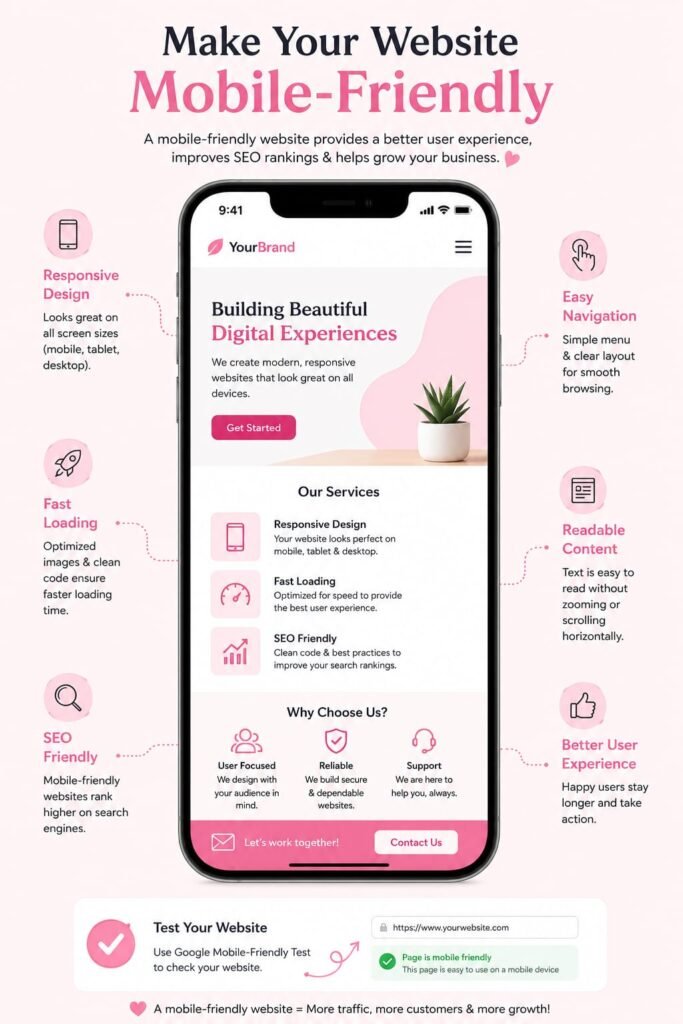
With more users browsing on phones and tablets, websites need to adapt smoothly to different screen sizes and devices.
A mobile-friendly website should have readable text, easy-to-use menus, properly sized buttons, and content that fits the screen without requiring unnecessary horizontal scrolling.
Check important pages on different devices to make sure everything works correctly.
Pay attention to:
- Font size
- Button placement
- Navigation
- Image sizing
- Forms
- Page layout
- Loading speed
A responsive website can make it easier for visitors to browse your pages regardless of the device they use.Mobile optimization is an important part of Technical SEO because search engines need to provide users with pages that work well across different devices.
3. Use HTTPS for Website Security
Website security is another important technical consideration.
HTTPS encrypts information exchanged between a website and its visitors. Websites using HTTPS normally display a secure connection indicator in modern browsers.
To use HTTPS, a website needs a valid SSL/TLS certificate.
After moving a website from HTTP to HTTPS, make sure that all important URLs are properly redirected to their secure versions.
You should also check internal links and other website resources to ensure they use the correct HTTPS URLs.Including website security in your Technical SEO process can help maintain a safer and more reliable website.
4. Create a Clear URL Structure
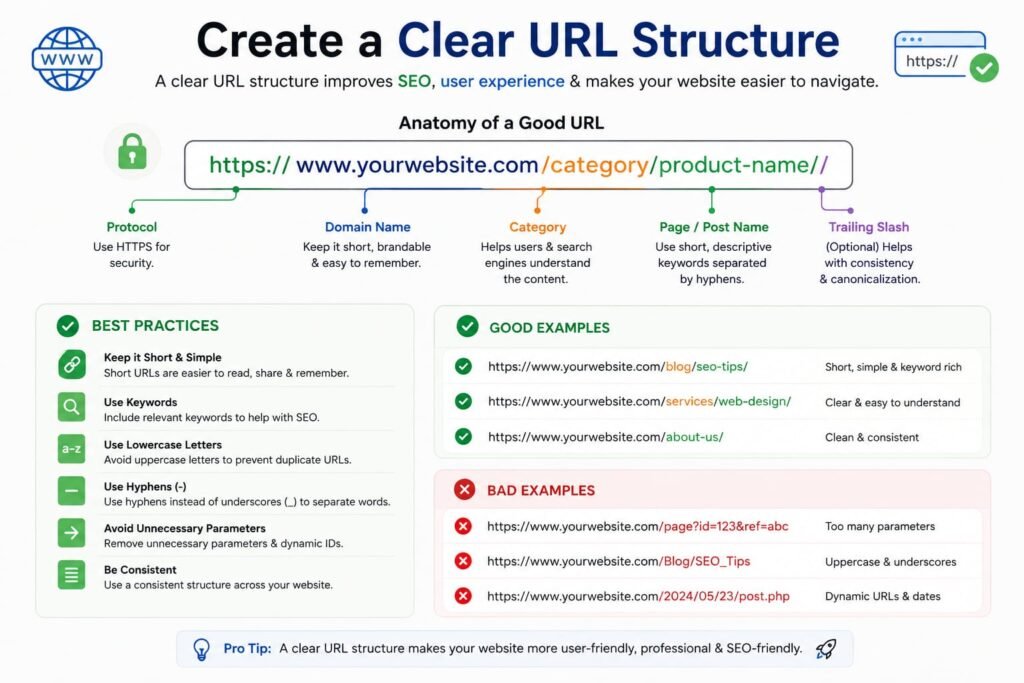
A well-organized URL format helps both visitors and search engines understand what each webpage is about.
Avoid unnecessarily complicated URLs containing long strings of random characters or parameters when they are not needed.
For example, a simple URL such as:
example.com/technical-seo-tips
is easier to understand than a URL filled with unnecessary numbers and symbols.
Keep URLs descriptive and relevant to the page topic.
A good URL structure can also help users understand what they are likely to find on a page before clicking it.
5. Create and Submit an XML Sitemap
An XML sitemap provides search engines with information about important pages on your website.
It can help search engines discover URLs, especially on larger websites or sites with complex structures.
After creating your sitemap, submit it through Google Search Console.
Check the sitemap regularly to make sure it contains the correct URLs and does not include pages that should not be indexed.
A sitemap does not guarantee that every page will appear in search results, but it can support the discovery and crawling process.As part of Technical SEO, keeping the XML sitemap accurate can make website management and URL discovery easier.
6. Check Your Robots.txt File
The robots.txt file provides instructions to search engine crawlers about which areas of a website they may or may not access.
It is important to configure this file carefully.
An incorrect robots.txt rule could prevent search engines from accessing important resources or pages.
Before making changes, understand which directories or files you are blocking.
Do not use robots.txt as a general method for removing pages from search results. Different technical methods may be appropriate depending on the situation.
7. Fix Broken Links
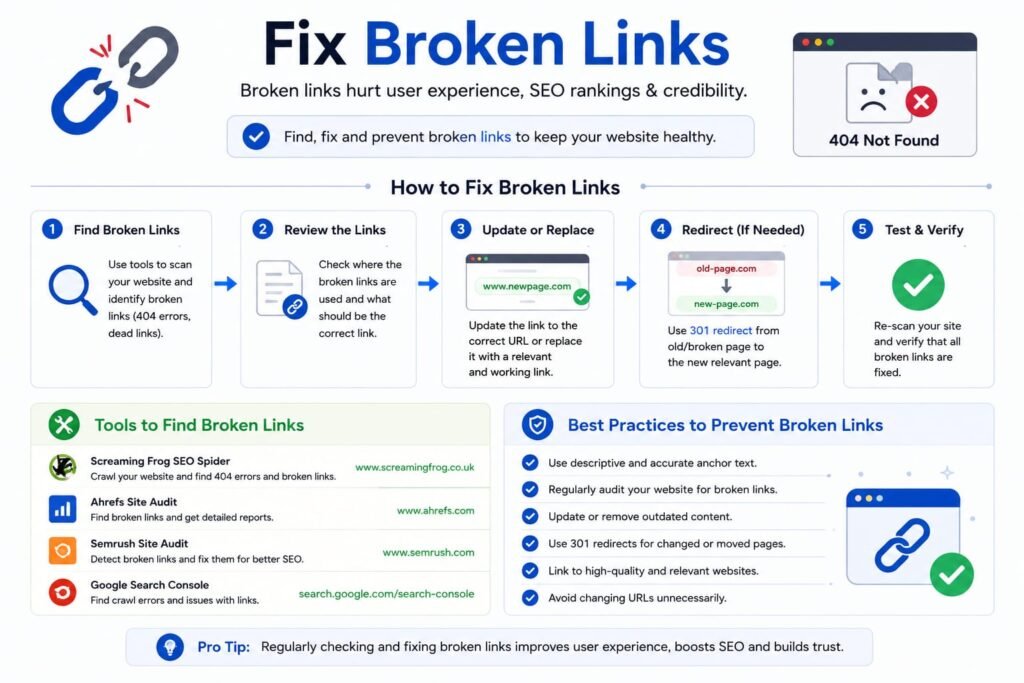
Broken links can frustrate users and make it harder for them to navigate your website.
.
When someone clicks a link and reaches a page that no longer exists, they may become frustrated and leave the website.
Regularly check your website for broken internal and external links.
If a page has been permanently moved, use an appropriate redirect to guide visitors and search engines toward the new location.
For deleted pages that have no replacement, consider whether the page should remain unavailable or whether useful content should be created at a relevant URL.
Keeping your website’s links healthy makes navigation easier.## 8. Use Internal Links Effectively
Internal links allow visitors to move easily between related pages within the same website.
They help visitors discover related information and can also help searchengines understand the relationship between different pages.
For example, a blog post about SEO keywords could link to another useful article about on-page SEO.
Use descriptive anchor text that gives readers an idea of what they will find after clicking.
Avoid adding internal links randomly. Each link should provide value and make sense in the context of the page.
9. Handle Duplicate Content Carefully
Duplicate or very similar content can create confusion about which version of a page should be considered the main one.
Duplicate content can sometimes happen unintentionally because of different URL versions, product filters, tracking parameters, or copied pages.
Review your website for unnecessary duplicate URLs.
Depending on the situation, solutions may include:
- Canonical tags
- Redirects
- Consistent URL structures
- Proper internal linking
The goal is to help search engines understand which version of your content should be treated as the primary page.
10. Use Canonical Tags Correctly
A canonical tag can indicate the preferred version of a page when multiple URLs contain similar or duplicate content.
For example, an online store may have several URLs that display similar products because of sorting or filtering options.
A canonical URL can help communicate which version should be considered the main page.
Canonical tags should be implemented carefully. Incorrect canonical settings can create indexing problems if important pages point to the wrong URL.
11. Improve Website Navigation
A clear website structure benefits both visitors and search engines.
Organize your pages into logical categories. Important pages should not be buried several levels deep without a good reason.
A simple navigation structure might include:
- Home
- About
- Services
- Blog
- Contact
Large websites may need additional categories and subcategories.
A logical structure makes it easier for visitors to find information and helps search engines understand how different sections of the website are connected.
12. Monitor Crawl and Indexing Issues
Crawling and indexing are two important technical processes.
Search engines crawl websites to discover pages and then decide which pages can be stored and shown in search results.
If important pages are not indexed, they may not receive organic search traffic.
Google Search Console can help website owners identify indexing problems.
Review reports for issues such as:
- Pages not indexed
- Server errors
- Redirect problems
- Blocked pages
- Duplicate URLs
Investigating these problems regularly can help maintain a healthier website.
13. Add Structured Data When Appropriate
Structured data is a way of providing search engines with additional information about the content of a page.
It can help search engines understand things such as products, reviews, events, articles, organizations, and other types of information.
When implemented correctly, structured data may make pages eligible for certain enhanced search result features.
However, structured data should accurately represent the visible content on the page.
Do not add misleading information simply to try to gain enhanced search visibility.
14. Optimize Core Web Vitals
Core Web Vitals are measurements related to important aspects of page experience.
They focus on areas such as loading performance, responsiveness, and visual stability.
A page that loads quickly but shifts around while a user is trying to click something can still create a frustrating experience.
To improve page experience, reduce unnecessary scripts, optimize images, improve server response time, and make sure page elements do not unexpectedly move during loading.
Regular performance testing can help identify areas that need attention.
15. Perform Regular Technical SEO Audits
Technical SEO is not a one-time task.
Websites change frequently. New pages are added, old pages are removed, plugins are installed, links are changed, and website designs are updated.
These changes can create technical issues without the website owner realizing it.
Performing regular audits can help identify problems early.
During an audit, review:
- Website speed
- Mobile usability
- Broken links
- Redirects
- Indexing
- Sitemap
- Robots.txt
- HTTPS
- URL structure
- Internal links
- Duplicate pages
You can use SEO auditing tools and Google Search Console to support this process.
Why Technical SEO Matters
Technical SEO creates the foundation on which other SEO activities can work.
Imagine spending time creating an excellent article, but the page cannot be crawled or indexed. The content may struggle to reach search users.
Similarly, if a website is difficult to use on mobile devices or loads extremely slowly, visitors may leave before interacting with the content.
Technical improvements can therefore support both search engine accessibility and user experience.
It is important to remember that Technical SEO alone does not guarantee high rankings. Quality content, relevance, authority, search intent, and many other factors also play important roles.
Conclusion
Technical SEO is an essential part of maintaining a healthy and search-friendly website. It focuses on the technical elements that help search engines access and understand your website while also improving the experience for visitors.A consistent Technical SEO strategy can support better website accessibility, performance, and search visibility.
Start with the basics: improve page speed, make the website mobile-friendly, use HTTPS, create clean URLs, maintain an XML sitemap, and check your robots.txt file.
Then move on to more advanced areas such as canonical tags, structured data, crawl management, internal linking, and Core Web Vitals.
Regular technical audits can help you discover problems before they become major issues. Instead of waiting until your website experiences serious performance or indexing problems, make technical checks part of your regular SEO routine.
A well-maintained technical foundation can support your content and other SEO activities more effectively. By keeping your website fast, accessible, secure, organized, and easy to navigate, you can create a better experience for users and give search engines a clearer understanding of your website.